Innovation

The Comet Revolution: The Future of Browsing Is Here — But Does It Bring New Risks?
07/10/2025
The conversation about the future of the internet is changing. With the launch of Comet Browser by Perplexity, browsing has evolved from a passive activity into an intelligent, AI-driven experience. More than just a tool to open websites, Comet acts as an Agentic Browser: it can automate tasks, summarize content, and carry out multi-step actions, effectively serving as an active digital assistant for knowledge work.
For enterprises, the implications are profound. On the one hand, Comet Perplexity AI promises faster research, smarter customer interactions, and a competitive advantage in knowledge work. On the other hand, it raises tough questions about security, compliance, and cost. Executives are left wondering: is this the next leap forward, or is it a risk disguised as innovation?
Executive Overview
For CIOs, CTOs, and digital leaders, Comet is more than a curiosity. It challenges the browser’s traditional role and introduces the concept of agentic browsing, where the browser itself becomes an intelligent assistant.
The hype is easy to see: productivity boosted through summaries, automation, and seamless collaboration. The reality is that adoption will depend on security, compliance, and measurable enterprise ROI. In other words, Comet may be the future, but only if it proves to be safe and reliable.
What Is Comet by Perplexity?
Comet marks a new chapter for Perplexity, signaling the company’s shift from being primarily a search platform to reimagining the very way we navigate and interact with the web. This shift paves the way for a browsing experience that is no longer passive but intelligent and collaborative, actively supporting knowledge work and decision-making.
Origins and Launch
Comet was officially announced by Perplexity AI in July 2025, marking the debut of the company’s first “AI-native” browser. Built on a Chromium architecture, Comet supports the same extensions and web compatibility as Chrome, but its defining feature is the integrated AI design: the engine itself is built to recognize, synthesize, and anticipate context.
Availability and Beta Access
Initially, access to Comet was restricted to Perplexity Max subscribers (at $200/month) and a small group of invited users in select markets. That early exclusivity allowed the company to test the browser in controlled environments.
Recently, Perplexity has taken a major step forward: Comet is now available globally and free of charge for all users on Mac and Windows. While there is no mobile version yet, development is underway. This marks a strategic shift from exclusivity to open adoption, signaling Perplexity’s ambition to make AI-native browsing a mainstream tool.
Download and Setup
Installation is straightforward, but implementation inside organizations is not. On the browser’s official website, users can simply locate and click the download button to retrieve the installer file for their specific operating system. Once installed, organizations are encouraged to begin with sandbox testing. This controlled environment allows IT teams to observe how key features, such as AI summaries and contextual memory, interact with sensitive data. While the installation itself is quick, Comet is not yet positioned to fully replace Chrome or Edge across an entire enterprise. Instead, it serves as a platform to pilot, experiment, and understand the potential of AI-powered browsing before committing to large-scale adoption.
How Does Comet Work?
Comet is not just a browser, it is a digital assistant embedded directly into the web experience. By integrating AI at its core, it transforms routine browsing into a context-aware workflow, enabling teams to navigate, process, and act on information more efficiently.
AI Summaries and Insights
One of its standout capabilities lies in generating AI-driven summaries. Rather than forcing users to sift through long documents or multiple web pages, it delivers concise, actionable insights in seconds, turning a tedious process into a quick, intelligent overview.
This has immediate benefits for enterprise teams. For instance, a research group investigating a competitor’s strategy can rapidly extract key takeaways across multiple sources, while customer service managers gain a clearer view of recurring issues without combing manually through support tickets.
Beyond speed, it adds a layer of insight: the AI identifies connections and context that might otherwise go unnoticed, helping teams spot patterns and make informed decisions faster.
Task Automation in the Browser
Beyond summaries, Comet introduces task automation directly within the browsing environment. Users can automate repetitive actions like data extraction, content aggregation, or drafting email responses.
Imagine a marketing analyst pulling statistics from multiple dashboards or a CX manager compiling customer feedback: what would take hours can now be condensed into a series of automated steps. This reduces manual workload and allows employees to focus on strategic, high-value activities, while still maintaining oversight and control.
Contextual Memory and Tab Collaboration
Another key differentiator is its ability to remember context across sessions. Unlike traditional browsers where each tab is isolated, it tracks interactions, open tabs, and ongoing tasks, so complex projects maintain continuity without extra effort.
When paired with Tab Collaboration, teams can share sessions and work on the same information simultaneously. A distributed innovation team can review research, compare sources, and annotate insights together: all within a single, AI-enhanced environment.
The result is a browsing experience that supports both asynchronous and real-time collaboration, transforming the browser from a passive display tool into a central hub for coordinated, intelligent work.
Integration with Perplexity AI Search
Finally, Comet integrates seamlessly with Perplexity AI Search, which provides real-time, cited answers directly in the browsing experience. Users can query information, cross-reference data, and receive contextual insights without leaving the browser.
This integration ensures that research, reporting, and decision-making are faster, more accurate, and fully embedded in the workflow, eliminating the friction of switching between tools. In practice, this means teams can move from information gathering to insight generation within the same environment, a significant efficiency boost for enterprises navigating complex knowledge work.
The Security Question: Innovation Meets Risk
Innovation rarely comes without risk, and Comet is no exception. While its AI-powered features promise productivity gains and smarter workflows, they also introduce new security challenges that enterprises cannot ignore. For CIOs, CISOs, and digital leaders, understanding these risks is critical before considering adoption at scale.
H3: Reported Vulnerabilities
Early reports and expert analyses have highlighted several vulnerabilities unique to AI-driven browsing:
- Malicious code injection: Automation scripts or AI features could be manipulated to execute harmful code.
- Phishing attacks: AI-generated summaries or responses might be exploited to create deceptive content that looks trustworthy.
- Automation misuse: Routine tasks automated by the browser could inadvertently propagate errors or expose sensitive operations if not properly controlled.
The key takeaway is that the very capabilities designed to enhance productivity can also become potential attack vectors without robust security governance.
Enterprise Privacy and Compliance Concerns
Beyond technical vulnerabilities, privacy and compliance are paramount for enterprise adoption. Comet interacts with a wealth of data, so adoption by businesses should be further influenced by privacy and regulatory considerations:
- CCPA, HIPAA, and data regulations: Comet must handle personal and corporate data in compliance with U.S. frameworks like the California Consumer Privacy Act (CCPA) and the Health Insurance Portability and Accountability Act (HIPAA), while also considering international standards such as GDPR for global operations.
- Data governance: Questions arise around how AI memory stores and shares information across sessions.
- Sensitive data exposure: AI summaries or contextual memory might inadvertently capture confidential business or customer information.
These concerns make it essential for enterprises to evaluate Comet’s privacy model and data-handling policies before widespread implementation.
For a deeper perspective on how AI tools navigate ethical and compliance challenges in regulated sectors like finance, see our article on AI ethics and compliance in financial services.
Why Security Will Decide Enterprise Adoption
Comet’s adoption in enterprises will come down to security. Advanced AI features are only valuable if they can be used safely. CIOs and CTOs need to assess the strength of its security architecture, the reliability of compliance measures, and the effectiveness of risk management.
In large organizations, success will depend less on innovation hype and more on whether Comet can deliver real value without exposing critical data.
Comet vs Traditional Browsers
Stepping into the browser market is no small feat. Chrome, Edge, and Brave are not just tools but ecosystems battle-tested, globally adopted, and deeply embedded in enterprise workflows. Comet, by contrast, is the newcomer, bringing with it the promise of AI-native browsing.
As an Agentic Browser, it goes beyond search: it can automate workflows, manage tasks across tabs, and deliver proactive AI-driven insights, setting it apart from traditional browsers. Comparisons are inevitable, but to understand where it fits, we need to see how it stacks up against these established giants.
Comet vs Chrome + Gemini
Chrome is the world’s default browser: fast, reliable, and powered by Google’s massive extension library. Its recent integration with Gemini AI adds conversational assistance but only as a complementary layer.
Comet, on the other hand, bakes AI into its foundation. The browser acts less like a static tool and more like a digital assistant that can summarize content, automate repetitive tasks, and even run multi-step workflows in the background.
Comet Browser highlights
- AI sidebar that writes emails, fills forms, and automates tasks.
- Integrated Perplexity AI search, delivering summaries with cited sources.
- Built on Chromium, ensuring compatibility with Chrome extensions.
- “Workspaces” feature for tab organization and multitasking.
Google Chrome highlights
- Fast, stable browsing with a familiar interface.
- Extensive extension ecosystem for customization.
- Cross-device sync for seamless access.
- Strong security features as standard.
Key takeaway: Chrome remains the safest bet for familiarity and scale, but Comet shifts the paradigm by making AI an inseparable part of browsing. For enterprises, the choice is between incremental AI assistance (Chrome + Gemini) and a radical AI-first browsing model (Comet).
Comet vs Microsoft Edge + Copilot
Microsoft Edge has steadily grown into a credible alternative to Chrome, boosted by its integration with Copilot AI. Edge excels in reliability and, most importantly, in its deep ties to the Microsoft ecosystem, a major advantage for enterprises entrenched in Office 365.
Comet, in contrast, positions itself as AI-first from day one. Its agentic browsing allows it to not only summarize but also take actions autonomously, such as planning trips or managing research workflows across multiple tabs.
When Comet makes sense
- You want advanced automation beyond simple AI chat.
- You prefer Perplexity AI search as the primary search engine.
- You are exploring AI-native workflows in innovation labs or pilot teams.
When Edge is the safer choice
- Your organization is heavily tied to Microsoft services.
- You need a mature, stable, and free browser for all employees.
- You want AI capabilities without the need for a new browser rollout.
Key takeaway: Edge is the pragmatic enterprise option, while Comet appeals to early adopters seeking a browser that feels more like an autonomous agent than a browsing tool.
Comet vs Brave (Privacy-First Approach)
Brave has built its reputation on privacy and ad-blocking, offering users a clutter-free and tracker-resistant browsing experience. Its model is simple: speed and security through fewer ads, fewer trackers, and a user-first approach.
Comet, meanwhile, is designed to act as an AI assistant browser, prioritizing automation and summaries over privacy-first architecture. However, Brave researchers recently uncovered a vulnerability in Comet, exposing it to prompt injection attacks that could compromise sensitive data.
Brave highlights
- Default ad and tracker blocking.
- Fast page loading and lightweight browsing.
- Strong privacy protections, though fewer extensions than Chrome.
Comet highlights
- Deep AI integration for search, summarization, and automation.
- Can compare and summarize multiple tabs simultaneously.
- Still maturing, with recent security flaws raising red flags.
Key takeaway: Brave is the choice for security-conscious users and privacy-first enterprises, while Comet offers groundbreaking AI features but must first prove it can secure sensitive environments.
While each comparison highlights unique strengths and weaknesses, executives often need a clear overview to quickly see what sets Comet apart from established browsers. The following table condenses the essentials of each option, from AI capabilities to enterprise readiness and security. It provides CIOs, CTOs, and digital leaders with a snapshot of where Comet is pushing the boundaries and where traditional browsers still dominate.
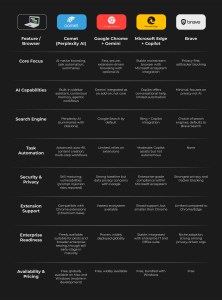
Comparison table: Perplexity Comet vs Chrome, Edge, and Brave. Source: Covisian
Pricing, Access, and Availability
Behind the excitement around Comet, there are still practical questions every enterprise needs to ask. How much does it cost, who can access it, and what does the roadmap look like? These answers shape whether Comet is something executives can test today or should place on their watchlist for tomorrow.
Is Comet Free?
Comet is now freely available to all users worldwide. The browser can be downloaded directly for Mac and Windows, with a mobile version currently in development. This marks a departure from its initial phase, when access was tied exclusively to the $200/month Max subscription. With the move to free availability, Perplexity aims to accelerate adoption and position Comet as the standard AI-native browser for both individuals and enterprises.
While the core browser is free, advanced features such as the “background assistant” remain exclusive to Max subscribers, reflecting a freemium model that balances broad adoption with premium upgrades.
Enterprise Budget Implications
With Comet now free to download and use, licensing costs are no longer a barrier to adoption. However, enterprise leaders must still evaluate indirect costs such as training, workflow integration, and security management. In addition, organizations considering premium features like Comet Plus or the Max-exclusive background assistant will need to assess whether these add-ons deliver measurable productivity gains that justify the investment.
Waitlist and Roadmap
With immediate worldwide availability for download, it is much easier for companies to launch pilot programs or implementations. Looking ahead, Perplexity has confirmed that a mobile version is in active development and that future updates will continue to expand functionality while ensuring enterprise-grade security and compliance.
Strategic Implications for Enterprises
Comet is not just another browser experiment. For enterprises, especially those in customer experience, research, and digital transformation, it raises a bigger question: what happens when the browser evolves from a passive tool into an active agent? The answer touches everything from how employees research information to how companies deliver value to their clients.
Agentic Browsing and the Future of Knowledge Work
For decades, browsers have been windows to the web, but they never acted on our behalf. Comet flips this model with what many call agentic browsing. Instead of employees manually searching, copying, and compiling, the browser itself becomes an assistant that can automate research, compare sources, or even execute multi-step workflows.
In the context of knowledge work, this could dramatically reduce time spent on repetitive tasks. Imagine a customer service leader asking Comet to gather competitive benchmarks across several websites or an R&D team using it to synthesize scientific articles. The shift is not just faster browsing: it is the beginning of the browser as a digital coworker.
Impact on Productivity, CX, and R&D
The benefits of Comet extend far beyond IT departments, touching the core of how teams operate every day. From streamlining routine tasks to enabling smarter customer interactions and faster research, its influence reaches:
- Productivity: Employees spend a significant portion of their day inside the browser. Automating form-filling, scheduling, or cross-referencing information can free up hours per week.
- Customer Experience (CX): Agents could use Comet during live interactions, instantly generating summaries of policies, products, or previous customer histories, making responses faster and more personalized.
- Research and Development (R&D): Teams working on new projects can leverage Comet to scan vast datasets, compare technical documentation, and surface insights with cited sources.
If adopted strategically, Comet could become the bridge between raw data and decision-making, supporting roles that demand both speed and accuracy.
Long-Term Adoption Curve
History shows that disruptive enterprise tools follow a predictable path: hype, pilot programs, selective adoption, and finally mainstream deployment. For Comet, the next five years will likely mirror that trajectory. Between 2025 and 2030, large organizations may start with controlled pilots in research-heavy departments or CX teams before rolling out more broadly.
The long-term adoption curve will depend on two factors:
- Security maturity: Without strong safeguards, CIOs will resist widespread use.
- Proven ROI: Enterprises will only scale Comet if the productivity boost and CX improvements are measurable.
For now, Comet sits at the start of its curve: exciting, experimental, and high-potential. The organizations that learn how to integrate it safely will be better positioned for the next era of AI-driven knowledge work.
Recommendations for Executives
For digital leaders, Comet is both an opportunity and a challenge. The browser is still in its early stages, yet it signals where the market is heading. The question is not just whether to use Comet today, but how to prepare the organization for the broader shift toward AI-driven browsing.
Pilot Testing Comet Safely
The safest path is to start small. Enterprises can deploy Comet in sandbox environments or launch risk-controlled trials within innovation teams. This allows IT leaders to observe how features like AI summaries and contextual memory behave when exposed to real workflows, without risking sensitive data or mission-critical systems.
Key Considerations for CIOs and CTOs
For technology executives, evaluating Comet requires a careful balance. Security and compliance remain non-negotiable, especially in industries with strict data governance. At the same time, a cost–benefit analysis is essential: does the productivity boost justify licensing at scale, or is Comet better positioned as a tool for select teams? Each organization will need to answer differently, but the framework remains the same.
Preparing for a Browser Evolution
Agentic browsing will not remain a niche concept. CIOs and CTOs who start aligning digital strategy today will be better prepared when AI-native browsers become standard. That may mean rethinking knowledge management, integrating AI into customer-facing tools, or simply building readiness for the next wave of digital transformation.
Conclusion
From everything we have explored, Comet emerges as a bold attempt to redefine the role of the browser in enterprise life. Instead of being a silent background tool, it aims to become an active partner in digital work. That ambition is what makes it compelling, but also what introduces new layers of risk.
In the end, the picture is simple: Comet represents both opportunity and uncertainty. Organizations that move early may discover productivity gains and CX improvements that set them apart, while those who hesitate may find themselves playing catch-up as the market evolves. Yet the real differentiator will not be speed of adoption, but the wisdom with which enterprises balance innovation against security.
For digital leaders, the message is clear. Preparing for the future of browsing is no longer optional, and Comet is only the beginning. We help enterprises transform every customer touchpoint with intelligent, AI-powered experiences.
FAQs About Comet Browser
What is Comet from Perplexity?
Comet is an AI-powered browser developed by Perplexity, designed to go beyond traditional browsing. It integrates AI tools for summarizing content, automating tasks, and managing multiple tabs, helping users navigate and act on information more efficiently.
How does Comet Browser work?
Comet combines a Chromium-based interface with deep AI integration. It offers features like:
- AI-generated summaries and insights directly in the browser.
- Automation of tasks such as email composition, form-filling, or multi-step workflows.
- Contextual memory and Tab collaboration for shared sessions.
- Integration with Perplexity AI search to provide source-cited results.
Is Comet Browser free?
Yes. Comet is now free and globally available for Mac and Windows users. Originally tied to the $200/month Max subscription, the browser has since been opened to everyone. While the core functionality is free, advanced features remain linked to premium plans. A mobile version is not yet available but is expected in the near future.
Is Comet Browser safe for enterprises?
While Comet shows promise, enterprises should consider:
- Running in sandbox environments for initial trials.
- Carefully managing sensitive data to avoid leaks.
- Monitoring updates to prevent security risks such as prompt injection or automation misuse.
Since Comet is now globally free, enterprises should approach trials with extra care, as broader usage increases the potential attack surface for vulnerabilities and misconfigurations.
How to get access to Comet Browser?
Comet can now be downloaded directly from the official Perplexity website without any waitlist or subscription requirements. The browser is available worldwide for Mac and Windows, with mobile support planned for a future release.
How does Comet compare to Chrome and Edge?
Comet differs from Chrome and Edge by embedding AI directly into the browser. Chrome and Edge offer speed, stability, and familiar ecosystems, but rely on extensions or limited AI features. Comet focuses on agentic browsing, where tasks, summarization, and workflows are guided or automated by AI.
Which is better: ChatGPT or Perplexity AI?
It depends on your needs. ChatGPT provides general-purpose AI assistance and content generation, while Perplexity AI (used by Comet) is designed for real-time web-based research and source-cited summaries, making it especially useful for enterprise knowledge work.